
10 Key Features in Effective Insurance Verification Solutions
Most patients do not understand their medical insurance coverage. Therefore, it is up to medical practices to verify patients’ insurance eligibility before their visit to make sure practices’ services will be reimbursed.
We’d like to cover the key nuances vital for the development and implementation of an effective insurance verification solution. However, prior to jumping straight to the list of must-have features, let’s grasp what the process of verification and authorization is about.
Key Highlights
Receiving authorization is an essential step in the verification process that helps avoid claim denials and reduce patient data errors.
Integration of insurance verification solutions with EHRs and other practice management systems allows for the automatic handling of upcoming appointments from the scheduler.
The insurance verification system can automatically flag missing information and create a dialer task for the front office, thus reducing manual follow-up.
Insurance verification software saves all historical results, allowing practices to track changes in a patient’s eligibility across the whole treatment plan.
What Is an Insurance Verification?
To put it simply, insurance verification is the process of contacting the insurance company in order to confirm that the patient’s healthcare benefits cover the requested procedures. This process is complemented by obtaining insurance authorization that helps determine a patient’s eligibility.
In particular, receiving authorization is essential to avoid claim denials. It also plays an important role by eliminating errors in patients’ data that cause billing denials and, consequently, time and money loss for practices. This results in faster and more efficient payments and reduced debt.
Insurance Verification Process
So what it takes to check patient insurance eligibility and how healthcare practices can ensure that a patient has coverage?
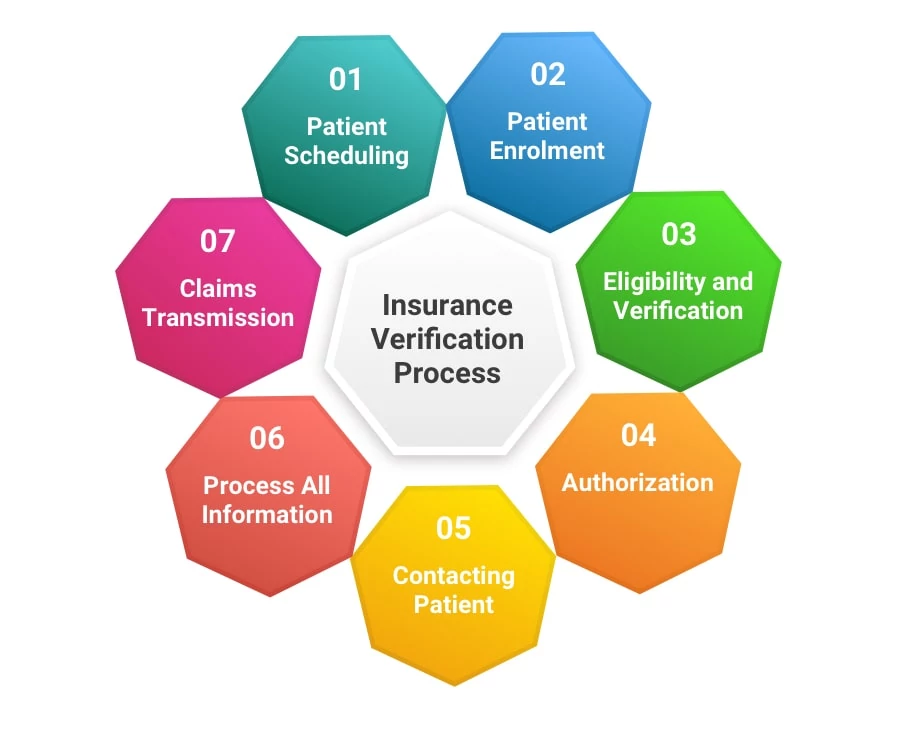
Generally, the insurance verification and authorization process includes several steps.
Patient Scheduling Receiving patient schedule from clinic or hospital.
Patient Enrolment Entering or updating demographic records and prior authorization for patient visit.
Eligibility and Verification Checking patient information with the insurance company.
Authorization Obtaining authorization of the claim for the medical treatment from the insurance carrier.
Contacting Patient Getting any additional data from the patient to process the application as well as updating the patient with necessary details.
Process All Information Updating the billing system with eligibility and verification data.
Claims Transmission Obtaining approval for the request from the insurance company to proceed with the reimbursement process.
The most obvious approach of implementing such a procedure is to deploy a patient’s eligibility verification tool. With so many options on the market, let’s take a look at what we think should be an ideal set of features for an effective Insurance Eligibility Verification Software.
Must-Have Features
1. Interfacing with PMSs
Integration with EHRs and other practice management systems is vital to automatically pull upcoming appointments from the scheduler. It’s the most effective way to check patient eligibility in-office.
The additional benefit is that you won’t need to re-train your staff again to master a new software tool. They will continue to work with the same software suite and will only learn a relatively small new portion of the verification mechanism UI.
Can insurance verification solutions integrate with existing healthcare software?
Yes, insurance verification solutions can be integrated with existing healthcare software such as EHRs and PMSs. This automates data exchange and handling, leading to more accurate data entry and minimizing claim denials. In addition, this integration allows checking patient eligibility in real time, thus significantly speeding up the process.
2. Automated Data Scrubbing and Correction
Scrubbing patient and insurance information for completeness and errors and returning results within the system allows practices to correct or update any insurance information before the time of the appointment.
Moreover, an ideal solution, once it has discovered that some patient or insurance info is missing, will generate a dialer task for the front office to call the patient or the carrier to gather the required info.
It can be a patient’s member ID, insurance company name, DOB, etc. In addition, there should be an easy way to add all these details into the system, e.g. from the screen of processing the dialer task.
3. Resubmitting Eligibility Requests
Ideally, insurance verification solutions should be capable of resubmitting eligibility requests with new information to verify coverage prior to the appointment.
It may be required that insurance is verified multiple times prior to an appointment. If insurance has been verified multiple times, the system should store all insurance verification results in its database, as opposed to keeping only the last one.
4. Key-Entry Eligibility Requests via EDI
Another feature of insurance verification solutions is automated key-entry requests, submitted to insurance companies who offer EDI. It allows insurance data to be gathered in advance of emergency situations or last-minute appointments.
In most cases, insurance verification is performed automatically several days before an appointment. It can also be verified on-demand any time by front-office employees.
5. Comprehensive Benefits Data for Every Patient
And last yet not least is the capability of insurance verification solutions to deliver comprehensive benefits data about every patient, regardless of their insurance and EDI availability.
An effective insurance verification solution should be able to deliver detailed, up-to-date data about patient’s insurance within several seconds.
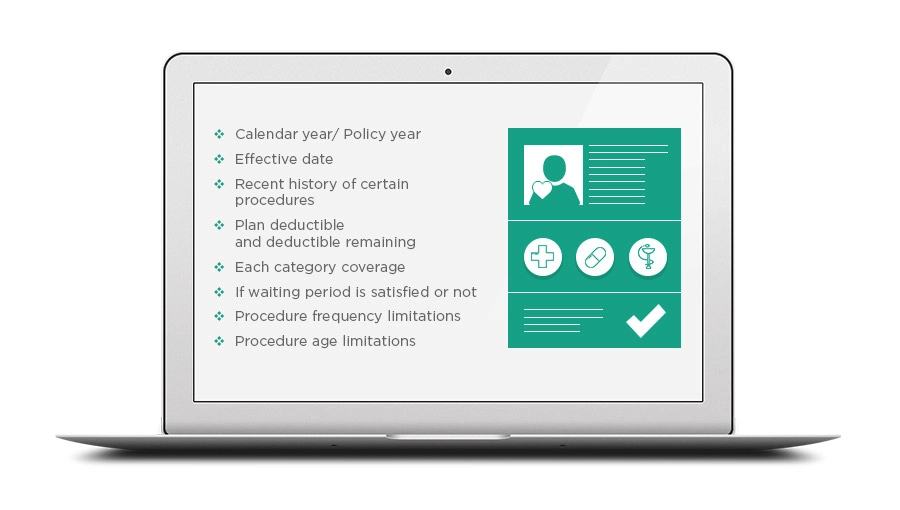
The following info should be provided about each patient’s insurance:
Calendar year/ Policy year
Effective date
Individual plan maximum and maximum remaining
Family plan maximum and maximum remaining
Individual plan deductible and deductible remaining
Family plan deductible and deductible remaining
Each category coverage
Per code coverage, if the insurance company provides such info
If the waiting period is satisfied or not
If deductible applies to a certain procedure or not
Procedure frequency limitations
Procedure age limitations
Recent history of certain procedures
Additionally, if there is any crucial info missing, the system should automatically generate a dialer task to call the insurance company. The task should be accompanied by a call script with a list of questions that need clarification. Once collected and entered, this information will be kept by the system, eliminating the need to call again in the future.
Nice-to-Have Features
6. Real-Time Verification Results
It’s very convenient when the tool you are using for patients’ eligibility verification can display the patient’s insurance details in real time and there is no need to follow up with the carrier to clarify some details.
How does real-time insurance verification benefit patients?
Real-time insurance verification provides clarity into coverage plans, allowing patients to avoid costly bills after treatment. Beyond that, insurance verification solutions automate the process, which significantly speeds up overall service and minimizes waiting time. After all, automation means fewer errors.
7. Patient Responsibility and Insurance Payment Estimates
This includes deductibles, benefits coverage, co-pay, or co-insurance options.
As soon as the system understands that some key info is missing for calculating the estimates of patient’s responsibility and insurance payment for each appointment, it creates a dialer task for the front office to ask the insurance company for that missing info.
Once the missing info has been collected and entered, it will be used to finish calculating the estimates.
8. Pre-Authorization Functionality
Some insurance policies require that you have authorization in place to bill for the rendered services. A proper tool will not only provide you with an option to track authorizations, but it will also send an alert to the front-office staff member when the patient has run out of authorizations.
Bonus Features
9. Historical Insurance Verification Results
An effective verification tool will allow you to track the changes in the patient’s eligibility across the whole treatment continuum.
All insurance verification results can be viewed on the patient info page (for all their appointments) and on the appointment page (verifications for this appointment only).
10. Insurance Verification Report
All insurance verification results for all the appointments for a certain date period are shown in a single interface. The report gives a quick overview and lets you quickly assess the current state of affairs. From there you can start planning appropriate actions to keep running your practice effectively.
Final Thoughts
For those who do choose to use electronic eligibility systems, the key to cutting down the human error and streamlining the process is in training staff to adequately use the selected system.
The insurance verification solutions that integrate with existing practice management systems require much less training than completely new systems, developed from the ground up.
On the bright side, a medical insurance eligibility verification solution can convert time-consuming routines into real-time revenue producing systems by providing:
Insurance verification prior to all appointments
Pre-authorizations before every test or procedure
Track available and expired benefits
Make sure to check if the medical insurance verification tool you are considering provides a sufficient set of features before opting for it.
Velvetech has successfully delivered a number of insurance verification solutions. We will be happy to share with you our best practices for implementing insurance verification into your existing practice management solutions.
Whether planning to deploy an off-the-shelf practice management system or requesting a custom-built solution — make sure your PMS includes these features.
Map out a successful strategy for custom healthcare apps development with our free tips. We will help you identify the key aspects of developing custom healthcare apps you should pay attention to.
What to do when software project causes delays and cost overruns? How to avoid common mistakes when working with an outside design firm? Here are five key aspects to consider when vetting a potential software development partner for your project.
Embracing digital solutions drives the healthcare environment. Keep reading to learn how it helps the industry improve care delivery and manage daily operations.
Balancing between the patient-centric and practitioner-focused approaches in custom healthcare software development. See how Cloud, Mobile Apps, Telemedicine, Wearables, IoT, and Artificial Intelligence influence healthcare software development.
Recognizing the ultimate benefits of speech recognition and analytics solutions, many organizations began to actively adapt them. Learn about the new perspectives they can open for your business.
We’ve accumulated solid experience across many industries and business cases and consolidated some of its examples in one place to help you make the right decision.
We offer a variety of engagement models for you to choose the one that can expedite your IT initiative and expand software development capabilities in the most efficient and suitable way for your business.
Being more than a team of IT professionals, we support a flexible and progressive environment to adapt to our clients' needs, earn their trust, and grow expertise.